 EN
EN  TH
TH  VI
VI 


 Customise Your Training

TechSource Systems is MathWorks Authorised Reseller and Training Partner

Next level after the fundamental
Learn how to create interactive user interfaces for your applications (apps) in MATLAB
Complimentary Services: Post training email support & 1-hr consultation session within 1 month after the course completion!

This one-day course demonstrates how to create an interactive user interface for your applications (apps) in MATLAB®. Attendees will learn about user interface controls, such as push buttons, sliders, and menus, and how to use them to create a robust and user-friendly interface for your MATLAB app. No prior experience of programming graphical interfaces is required. Topics include:

MATLAB users who need to build custom user-friendly interface (apps).

MATLAB Fundamentals

Upon the completion of the course, the participants will be able to:
TechSource Systems is MathWorks Authorised Reseller and Training Partner
Objective: Use App Designer to create and share an app by laying out components and giving them interactive behavior.
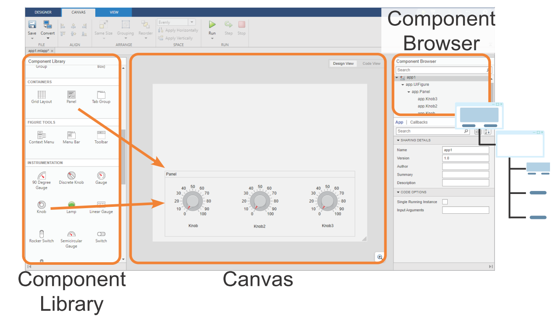
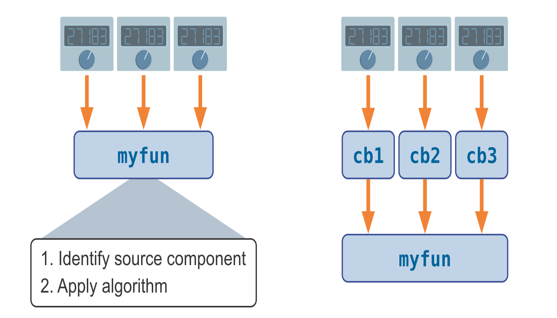
Objective: Create apps with graphical elements that can be modified by user interaction, as well as apps with continuously adjustable components.
Objective: Create robust and flexible apps with components that adapt appropriately to user actions.
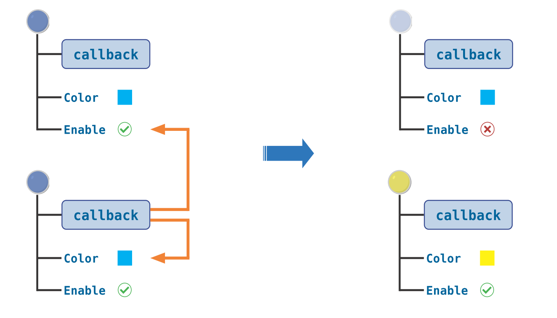
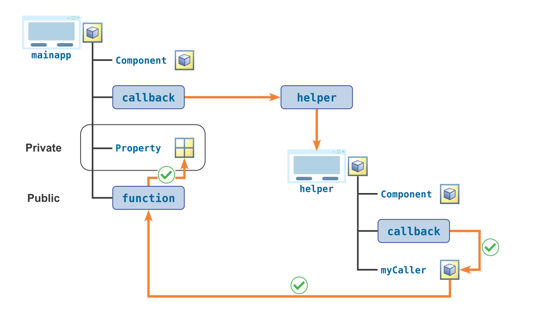
Objective: Create apps that use extra dialog windows and helper apps.